
Telegram, WhatsApp, IRC and Twitch, in one window.
Yoake is a free desktop client that brings Telegram, WhatsApp, IRC and Twitch together in one mIRC-style multi-window interface — with scripting, commands, and the same logic of old-school mIRC clients, applied to today's messaging.
Free for personal use. No new account to create: use your existing Telegram and WhatsApp, connect to any IRC server, or link your Twitch account.
What Yoake is, and why it exists
This isn't "yet another chat app": it's a different — older, and in some ways more powerful — way of handling the conversations you already use every day.
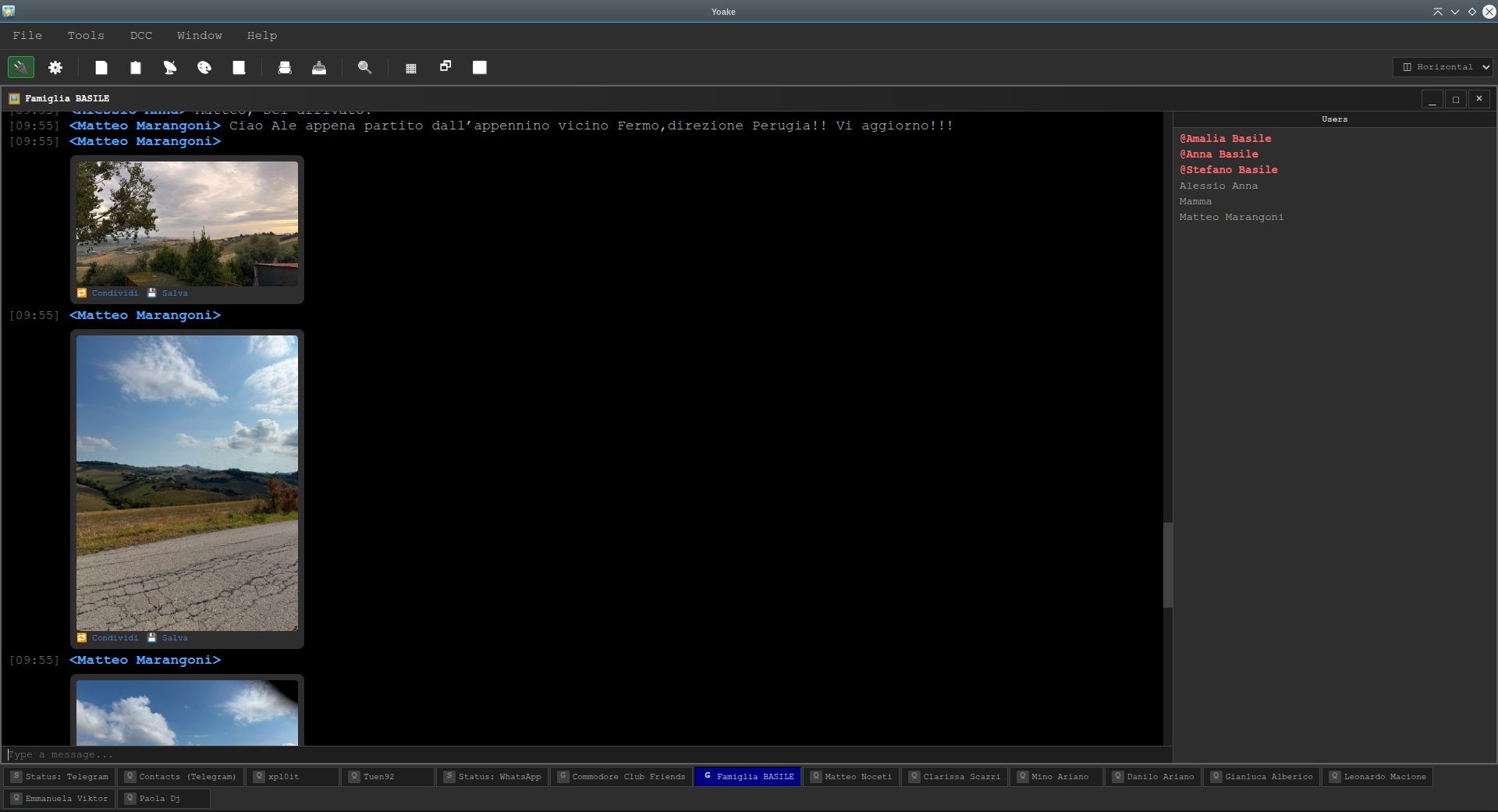
Anyone who used mIRC or an IRC client back in the '90s and 2000s remembers that logic well: lots of small windows open together, a taskbar to jump between conversations, quick commands typed on the keyboard, and the ability to write your own small scripts to automate whatever repeats. It's a way of working built for people who live inside messaging all day, not for a quick glance every now and then.
That logic has mostly disappeared today. Modern messaging apps — Telegram and WhatsApp included — are built for the phone: one conversation at a time, barely scriptable, and separate from each other even when you use both every day for the same people.
Yoake brings that logic back to the desktop, applied to Telegram, WhatsApp, IRC and Twitch together. One app, one place to look, as many windows open at once as you want, and a real scripting engine (aliases, events, popups, identifiers — the same syntax as the original mIRC) for anyone who wants to automate replies, commands or notifications.
What you can do
Built for the daily use of anyone with a lot of conversations to keep up with.
Telegram, WhatsApp, IRC and Twitch together
Four different networks, a single window list and one taskbar. QR login for Telegram and WhatsApp, direct connection for IRC, browser login for Twitch (multiple accounts/channels at once too) — no complicated setup.
mIRC-style multiple windows
Every chat is its own window — movable, resizable, minimizable — not a single scrolling list like modern apps.
Scripting engine
Aliases, right-click popups, events ("on message", "on join"...) and $identifiers, just like real mIRC. For anyone who wants to actually automate things.
DCC-style file sending
Transfers with a real progress bar, a Stop button, and resumable downloads (on Telegram) instead of starting over.
Share and forward
Native forwarding between chats, even across networks — photos, videos, audio and documents, with quick recipient search.
Built-in voice transcription
Voice messages are transcribed locally (whisper.cpp), without sending the audio to any external service.
Just like real mIRC
A small taste of the command engine — works in any window, chat or Status.
> /msg Mario See you at 6?
> /share Mario video3
System: video shared with Mario
> /dcc send Mario report.pdf
System: sending... 42% [Stop]
Download Yoake
Version 1.1.24 — free for personal use (license details). Pick your platform.
Linux
macOS
xattr -cr /Applications/Yoake.app, then try again. Auto-update is experimental for the same reason: if it fails, Yoake will tell you and send you back here.Frequently asked questions
Is Yoake official, or affiliated with Telegram/WhatsApp/Twitch?
No. Yoake is an independent, unofficial client, not developed or endorsed by Telegram FZ-LLC, WhatsApp/Meta, or Twitch. It connects to these services with the same credentials you already use (QR code for Telegram/WhatsApp, direct login for Twitch), with no intermediaries.
Does Yoake support Twitch too?
Yes. Besides Telegram, WhatsApp and IRC, Yoake also connects to Twitch: channel chat, whispers (Twitch's private messages), multiple accounts and channels at once, and a dedicated video window with the /video command. See the Twitch section of the Commands guide and the Twitch section of the Connecting guide for details (including login, which goes through an embedded browser instead of an official API, which Twitch doesn't offer).
Is there a guide with all the commands and features?
Yes: the full guide is available here online, or inside the app itself (Help menu). It covers commands, scripting (aliases/popups/events), identifiers, windows and options.
Do I need to create a new account?
No: Yoake connects to your existing Telegram and WhatsApp via QR code — the same way you'd link a new device to the official apps —, to your existing Twitch account, or to any IRC server, which doesn't need an account at all.
Do my messages pass through someone else's servers?
No. Yoake connects directly to Telegram's, WhatsApp's and Twitch's servers (or to whichever IRC server you choose), exactly like the official app/site would — there's no Yoake server in between.
Is it free?
Yes, for personal use: downloading and using it are free, with no time limits or locked features (just an initial waiting screen, like old shareware programs, which closes on its own after a few seconds). Commercial use requires an €8 license. Personal users can also buy it if they want to support development — it also removes the initial wait. Details on the License page.
Does it update itself?
Yes, automatically, on Windows and the Linux AppImage. On macOS, since the app isn't signed by Apple, auto-update may not work reliably: if it fails, Yoake will tell you and send you back here to download the latest version manually.
Is there a FreeBSD version?
No: Yoake is built on Electron, which doesn't publish official builds for FreeBSD (only Windows, macOS and Linux). It can't be compiled for that platform. FreeBSD users with the Linux compatibility layer can try the Linux x64 build unofficially, with no guarantees.